UX Case StudyRetail Finance & Ops

BreezePOS

A touch-first retail register engine designed to streamline store checkouts under 12 seconds, protect transaction ledger integrity with JSONB snapshots, and guarantee offline resilience.

RoleUX Design & Full-Stack Eng.
Target Device10" Countertop Register
Core TechNext.js, Zustand, Supabase
Performance< 12s Checkout Flow
Scroll to start
01. Executive Summary

Project Overview

Design a fast, touchscreen-optimized Point of Sale (POS) tablet web application for a local household convenience store. The platform must streamline customer checkout under 12 seconds, manage real-time inventory balances, track store earnings statistics, and replace traditional handwritten logs.

02. Empathy & Context

Introduction & Empathy

This POS system started out of a real-world problem close to home. A close friend of mine, Krish Agrawal, runs a local retail convenience store selling daily household goods like plastic containers, microfiber sponges, brooms, and detergents. For years, his entire billing, inventory tracking, and customer account ledgers (hisaab) lived inside stacks of paper notebooks and handwritten diaries.

It was an operational nightmare. Pages would frequently tear or get misplaced, entries were easily forgotten, and manually tallying up sales at the end of the month meant sitting with a calculator for hours. During peak evening rushes, writing physical bills by hand created long customer queues and visual chaos at the counter.

I decided to design and build a tablet-native POS for his counter register. The mission was clear: scrap the paper diaries, prevent billing records from getting lost, and give him a touch interface that works instantly during checkout rushes.


03. Field Observations

Observations

Forming a retail order takes a lot of effort

I observed that manual register log writing requires cashiers to copy details twice (once in the checkout log, and once in outstanding debit notebooks). This redundant data-entry loop demands heavy coordination, slows down the check-out flow, and frequently introduces transcription mistakes.

Multiple pricing configurations before billing

The shop owner creates different wholesale and retail calculations depending on item pack sizes. He constantly calculates price options in his head mid-transaction, delaying final billing until he feels comfortable with the final checkout total.

04. Friction & Blockers

Friction & Blockers

Information Overload

Friction occurs due to the availability of too many counter options and manual billing methods. Cluttered workspaces and notebook piles confuse cashiers, causing ordering errors and visual chaos at the counter during peak hours.

Losing Track of Account Logs

By documenting outstanding transactions across separate notebooks and loose credit sheets, the shop owner loses physical oversight. There is a high financial risk of losing customer debit summaries entirely.

05. Research Synthesis

Research Synthesis

Adding items and checking out should be a breeze

To streamline customer lines under 12 seconds, cashiers must search and select store catalog purchases with minimal screen taps and zero nested menus.

Data persistence is key

Traditional paper logs or spreadsheet entries fail to freeze pricing configurations. The system must record immutable item parameters at the exact moment of checkout to prevent subsequent catalog edits from altering history.

06. Project Scope

Scope of Work

Within the spectrum of digital utility services used at present for retail checkout, shop owners and cashiers require a highly collaborative, fast, and touchscreen-optimized platform that simplifies stock auditing and transaction management.

The solution is a tablet-native web application designed specifically for counter registers, which operates instantly without database lag, buffers offline transactions during power drops, and integrates seamlessly into the daily workflows of store operators rather than forcing them to master complex systems.

07. Target Personas

Research & User Personas

By translating the Observations and Pain Points into operational parameters, I detailed the primary cashier requirements:

  • Time and Place: Checkout happens in a fast-paced retail zone. Cashiers do not have time to navigate nested settings menus or wait for database loading screens.
  • Communication: The owner manages calculations and base wholesale configurations, whereas cashiers and workers only handle register checkouts and stock shelf listings.
  • Order of Events: Cashiers scan or select items, modify cart numbers, pick cash/online formats, apply store discounts, and print invoices.
Krish Agrawal

Krish Agrawal

Store Owner & Manager

Experience: 8+ years

“I just need a register screen that never freezes, is large enough to tap without making mistakes, and automatically logs customer transactions so I don't lose my accounts book.”

Goals

Ditch handwritten ledger files for secure, auto-logged digital receipt records. Restrict register cashiers from editing pricing scales and audit revenue tallies in seconds.

Frustrations

Losing written logs or forgetting customer credit summaries. Operations halting completely when counter local Wi-Fi shuts down.

Rahul

Rahul

Store Cashier & Operator

Experience: 1 year

“I need an interface that lets me select items and process checkouts under 12 seconds. It has to be dead simple so I don't hit wrong buttons when customer queues get long.”

Goals

Fast checkout taps using high-accuracy items selectors. Instant toggle switches between billing configurations and client receipts.

Frustrations

Accidentally tapping administrative configuration dials. Getting confused by complex inventory breakdown graphs and finance analytics dashboards.

08. Design Strategy

Core Objectives & Strategy

Based on the inferences and the working of the solution, the key objectives of the app are the following:

1. Touch-Optimized Register Layout

All navigation controls and product grids are locked to a minimum of 56px to ensure cashiers can select items and modify cart quantities quickly without visual searching or misclicks.

2. Instant Retail / Wholesale Pricing

A single tap switches checkout pricing models. The calculations run client-side immediately, allowing immediate adjustments during checkout rushes.

3. Offline Zustand Fallback Buffer

If the internet goes offline, checkout carts queue transactions locally. Once the connection is restored, the queue syncs with the database automatically.

4. Local Client-Side PDF Receipts

Invoices compile directly on the tablet register using jsPDF vectors, avoiding server-side delays and printing instantly.

09. Strategic Alignment

The 5 Ws Alignment

What?

A localized, cloud-first POS tablet dashboard that manages checkout carts, stock alert thresholds, customer billing history, and business parameters.

Why?

To prevent handwritten accounts from being damaged or lost, reduce cashier arithmetic errors, and automate hours of month-end billing tallies.

When?

At the counter register during peak retail evening rushes, where sales processes must run cleanly without screen freezing or database lags.

Who?

A local convenience shop owner (who audits profits and updates catalog parameters) and cashiers (who register items quickly).

Where?

Directly on a 10" touchscreen Android tablet mounted at the store checkout counter.

How?

Using Next.js 15, Zustand persistent storage (for offline queueing buffers), PostgreSQL database syncer, and client-side jsPDF compilers.

10. System Interfaces

Introducing my POS

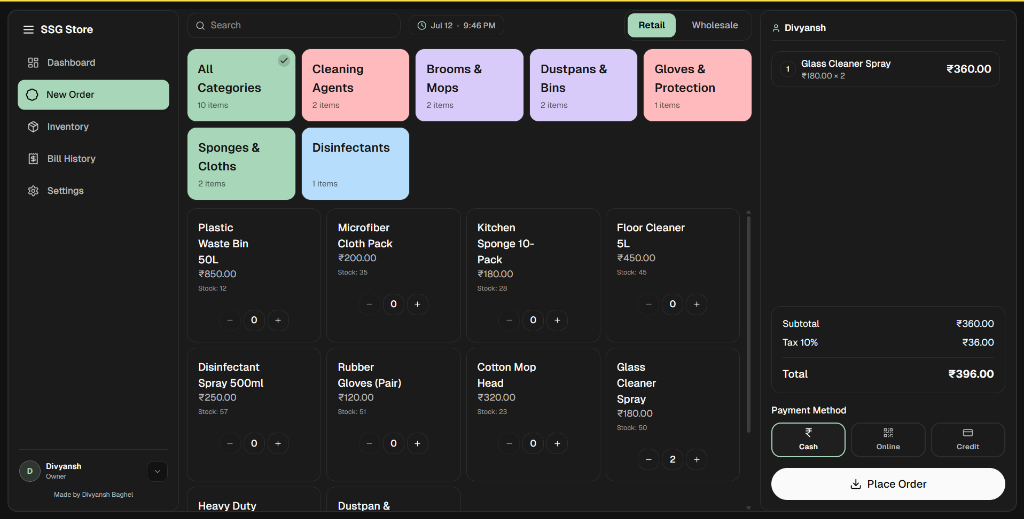
Screen 1

New Order register workspace

POS Register Screen Interface
Main navigation tabs

Sidebar navigation options are grouped on the left, keeping screen switches close to the cashier's thumb for single-hand tablet register operations.

Pricing Profile switch

Toggles checkout pricing between Retail and Wholesale instantly mid-session. The system recalulates item rates locally, bypassing network latency.

Touch-First item cards

Product and category selector cards are designed with a minimum of 56px targets to ensure high tap accuracy and prevent cashier misclicks.

Keyboard-only checkout binds

Pressing the Enter key shortcut triggers the payment flow and client invoice generation immediately, speeding up checkout counter lanes.

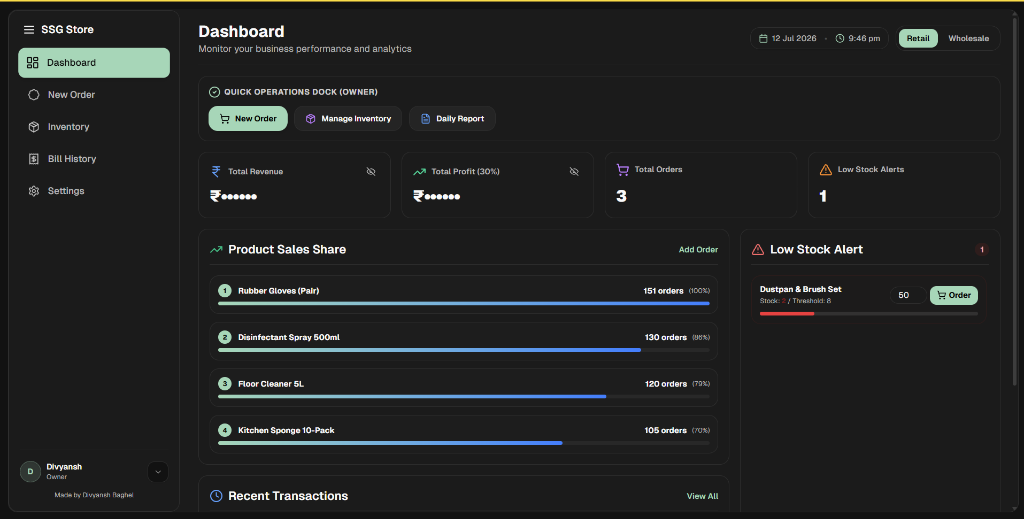
Screen 2

Analytics Dashboard

POS Admin Analytics dashboard
Sensitive data obscurity mask

Revenue and profit statistics cards are blurred by default. Clicking the eye toggle icon reveals numerical values, keeping store financials safe from customer view.

Low-Stock depletion warnings

Tracks inventory limits against warning thresholds, flashing red alerts for products running low to prompt timely restocking.

Role-Aware Quick Actions

Features a shortcuts dock displaying specific settings key options depending on logged-in roles (Owner, Cashier, or Worker).

Horizontal Sales charts

Product sales distribution is formatted into clean horizontal progress bars, keeping layout visual density simple and easy to scan.

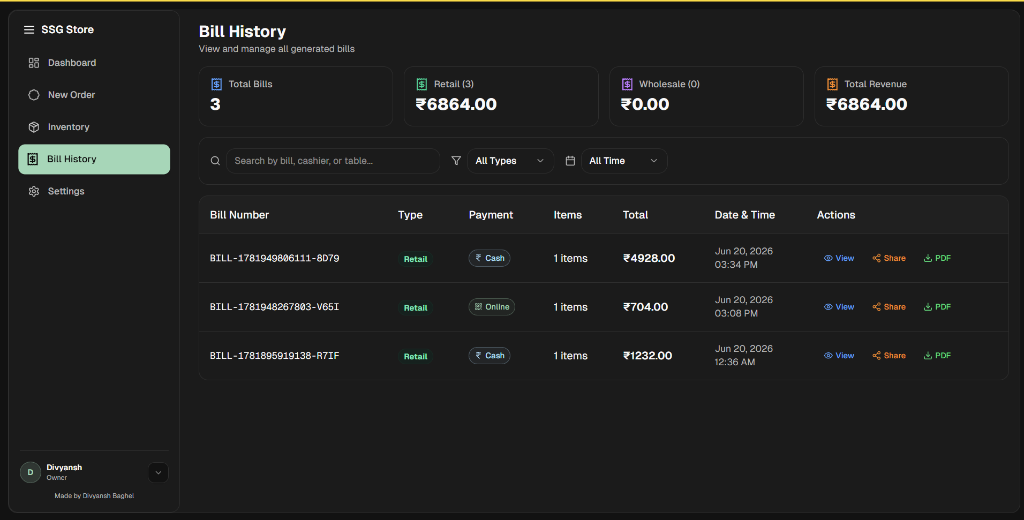
Screen 3

Immutable Ledger Log

POS Transactions ledger Screen
Immutable JSONB snapshots

Freezes invoice product logs at checkout time, preventing pricing fluctuations in the catalog from retroactively altering transaction reports.

Flat Table Ledger

Logs rows detail invoice IDs, retail/wholesale types, pay formats (Cash vs Online), and total calculations inside a single, filterable view.

Fast client receipt downloads

Invoices are compiled client-side using jsPDF vectors, outputting compact thermal layouts in 0ms without server database traffic.

Instant Share modal

Provides quick action shortcuts (WhatsApp formatting templates, native Web Share dialog triggers, and copy links) to support paperless billing.

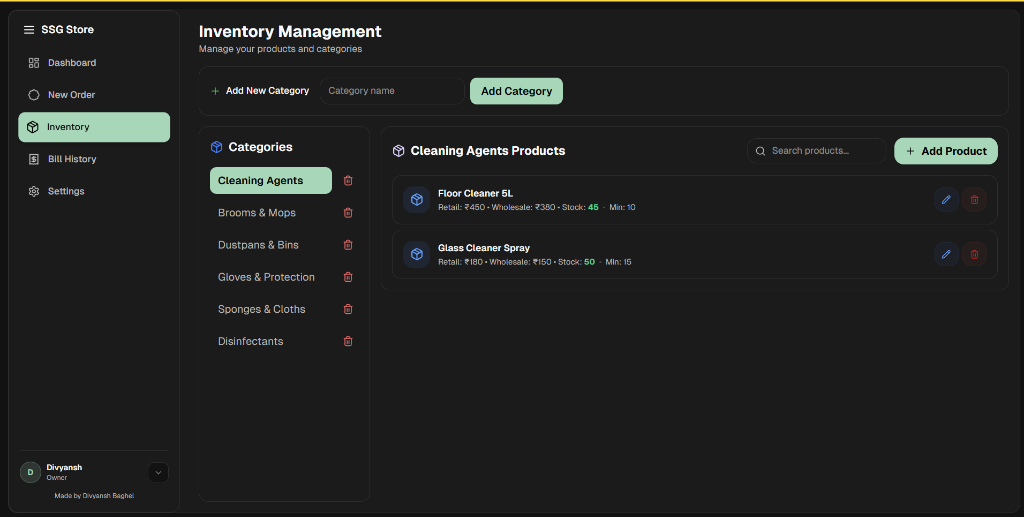
Screen 4

Catalog Inventory Manager

POS Catalog inventory manager screen
Split-pane category tree

Displays catalog folders on the left pane and product listings on the right, keeping index navigation simple and reducing cognitive fatigue.

Inline pricing configurations

Admins modify retail/wholesale prices directly inside row table fields, removing slow, multi-page settings menus.

Slide-over product drawer

Adding new products or editing configurations slides out from the right margin, keeping operators in context.

Cascading cleanup

Deleting catalog categories automatically triggers cleanups on related items, maintaining database structural integrity.

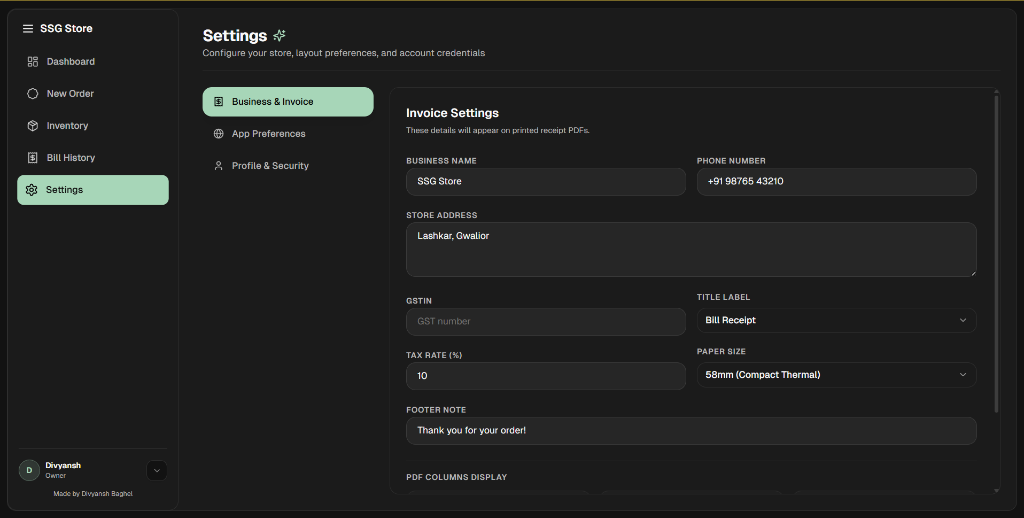
Screen 5

Business Customizations

POS invoice template settings screen
Zustand persisted form store

Business credentials, address layouts, and tax structures are cached locally in the browser, surviving power outages or register resets.

Printer paper ratio sizing

Toggles template spacing between standard A4 prints and 58mm compact thermal papers, formatting invoice vectors dynamically.

GSTIN & Tax validations

Official store tax percentages and registration numbers are validated inline, ensuring invoice generation matches auditing guidelines.

11. Technical Resiliency

Engineering for Resiliency

A clean interface design is only half the battle. If a cashier tab crashes during checkout, or a network drop corrupts stock calculations, the user experience falls apart.

I chose Next.js 15, Zustand, and Supabase to build a fast front-end architecture designed for real-world resilience:

useCartStore.ts
Zustand Store
const useCartStore = create()(
  persist(
    (set, get) => ({
      cart: [],
      offlineQueue: [], // Offline buffer
      checkout: async() => {
        consttx = { id: genId(), items: get().cart };
        if(!navigator.onLine) {
          set(s => ({
            offlineQueue: [...s.offlineQueue, tx],
            cart: []
          }));
          triggerLocalInvoice(tx);
          return;
        }
        await supabase.from('bill_history').insert(tx);
      }
    })
  ) );

Preserving History with JSONB

In transaction recording systems, linking items purely through dynamic relationships to a productstable introduces tax audit vulnerabilities. If an item's price, stock tax level, or title is updated in the future, past transaction statistics will retroactively skew.

To prevent this, our checkout stores the full transaction item details in an immutable JSONB array snapshot in the database. This permanently freezes cart parameters as they existed at the exact millisecond of purchase.

SQL Schema Definitionbill_history.sql
CREATE TABLE bill_history (
  id UUID PRIMARY KEY,
  total_amount DECIMAL(10, 2),
  line_items JSONB NOT NULL,
  created_at TIMESTAMP DEFAULT NOW()
);
12. Future Companion

Future Scope: Mobile Sync Companion

Operating a local retail store means my friend has to run around to warehouses, check stocks on shelf displays, and coordinates deliveries. Being stuck behind the checkout counter tablet all day is impossible.

In the next iteration of the project, I plan to develop a companion **mobile application**. This mobile version will sync real-time sales revenue, low-stock notifications, and transactional bill databases via Supabase, allowing him to check dashboard reports and update catalog prices remotely from his phone while on the move.